Machine Learning Detection Robot
The Problem
Teach your 3Create robot to recognize 7 objects and use these objects to navigate a maze. The objects are located in Blake. Details/Requirements/Challenges were as follows:
- All turns will be 90 degrees
- At the last object, do something fun
- You must turn when the object is 6 inches from your camera
- You will learn which direction to turn 10 minutes prior to the demos (you will have 10 minutes in class for this)
- You will not know ahead of time the orientation of the objects
- You may not use hot glue or tape
The Process
Machine Learning
Using teachable Machine runner by google, we were able to teach AI to recognize 7 different objects and give us a confidence score of each object based on images. The seven objects were as follows:
- Stuffed Kiwi
- Stuffed Bear
- Mario figurine
- Lego Darth Vader
- Rubic’s cube
- Silver Elephant
- Mug
Using these 7 objects, we are able to train a model which detects each object very accurately. The function predict takes in a photo and outputs the prediction classname
Coding
The code is simply recursing through the forward motion of the 3create robot until an ultrasonic sensor detects an object 6 inches away from the robot. At that point, the robot uses the camera to take a picture and l then analyze the photo and makes a prediction. Based on the classification and Airtable data the robot will move left or right and then continue to go straight and repeat the process. the code below is used in order to command the robot through the process described above.
Electronics
Electronic components include a camera and an ultrasonic sensor to detect distance. The camera is used to give the model a datapoint for prediction and the sensor is used to detect distance from an object, 6 inch minimum was a requirement.
above you can see the wiring diagrams fro both the camera and the ultrasonic sensor. first the camera can be seen as just inserting the strip into the slit located on top of the raspberry pi.
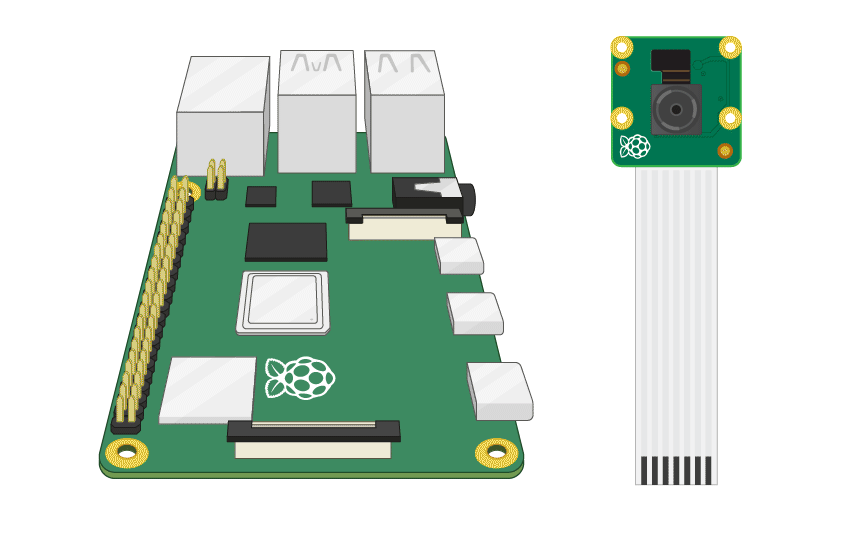
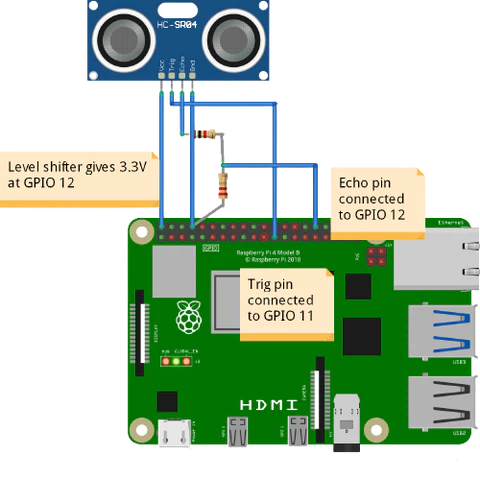
Above you can see the wiring diagrams for the camera used for object recognition. First the camera can be seen as just inserting the strip into the slit located on top of the raspberry pi. The ultrasonic sensor can be seen configured below by connecting a few wires to the raspberry pi
The Solution
The project was an overall success. We were able to navigate the maze with very little trouble. The video below shows the robot navigating throughout the maze, challenges include3d having the ultrasonic sensor not record softer object such as stuffed bear and kiwi.